🔥Moving Data to the Cloud Doesn’t Have to Be Hard
Whether you’re migrating a few gigabytes of files or petabytes of enterprise data, transferring data to Google Cloud Storage (GCS) can seem daunting.
The good news? Google Cloud provides multiple transfer methods tailored to different use cases — from one-time online transfers to massive physical migrations. Knowing the right method saves time, money, and headaches.
1️⃣ Online Transfer: Quick and Simple
For one-time or small-scale transfers, the simplest approach is online transfer.
- Tools:
gsutilor Cloud Storage API - Best for: Small transfers, generally less than 1 TB
- Pros: Fast to set up, no scheduling needed
Use Case Storyline:
Imagine you have a small project with 500 GB of backup files from your local server. Using gsutil cp, you can transfer your files directly to GCS in hours without complex configuration.
2️⃣ Storage Transfer Service: Automated & Large-Scale
For large-scale or repeated transfers, Google Cloud recommends Storage Transfer Service.
- Supports:
- On-premises data centers
- AWS S3
- Azure Blob Storage
- Google Cloud Storage buckets
- Key Features:
- Repeating schedule for automated transfers
- Incremental transfers (only changed objects)
- Reliable & fault-tolerant — resumes from where it left off in case of errors
Comparison: Storage Transfer Service vs gsutil
| Feature | gsutil | Storage Transfer Service |
|---|---|---|
| Data size | < 1 TB | > 1 TB |
| Source | On-prem / GCS bucket | On-prem, GCS, AWS, Azure |
| Automation / Scheduling | ❌ Manual | ✅ Scheduled / recurring |
| Fault tolerance | ❌ Manual | ✅ Automatic retries |
| Best For | Small one-time transfers | Large-scale, multi-cloud transfers |
Use Case Storyline:
Your company has 5 PB of historical logs stored on-premises and in AWS. Storage Transfer Service can automatically migrate, schedule, and incrementally transfer the data without manual intervention — saving weeks of effort.
3️⃣ Transfer Appliance: Physical Data Migration
For massive datasets or when online transfer is too slow, Google offers Transfer Appliance, a physical device shipped to your data center.
- Best for:
- Data sizes > 20 TB
- Transfers that take > 1 week online
- Process:
- Request a Transfer Appliance from Google Cloud
- Upload your data to the appliance
- Ship the appliance back to Google
- Google uploads the data to GCS automatically
- Performance:
- Fast copy speeds up to 40 Gbps
- AES-256 encryption with customer-managed keys
- Scalability:
- Order multiple devices (TA40, TA300) if required
Use Case Storyline:
A media company with 50 TB of high-resolution video footage needs to migrate to GCS. Transfer Appliance allows them to securely copy and ship the data, ensuring fast upload while minimizing network strain.
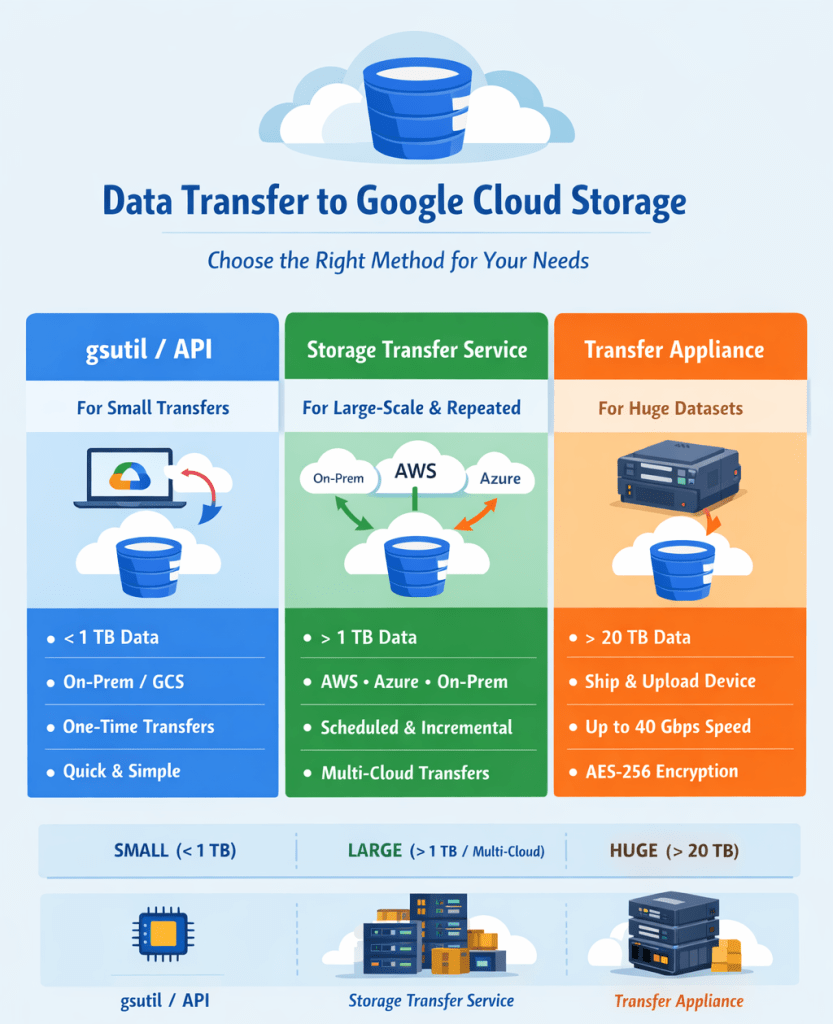
💡 Summary:
- Small & one-time transfers (<1 TB): Use gsutil or API
- Large-scale or recurring transfers (>1 TB, multi-cloud): Use Storage Transfer Service
- Massive datasets or offline migration: Use Transfer Appliance
📚 Mock Cloud Digital Leader Exam Question
- Q: Which Google Cloud service is recommended for transferring petabytes of data from on-premises?
A: Storage Transfer Service - Q: When should you use
gsutilinstead of Storage Transfer Service?
A: When transferring less than 1 TB from on-premises or another GCS bucket - Q: Your company needs to migrate 50 TB of data and online transfer will take over a week. Which method should you use?
A: Transfer Appliance - Q: Can Storage Transfer Service perform incremental transfers?
A: ✅ Yes, it only transfers changed objects - Q: Does Transfer Appliance support encryption?
A: ✅ Yes, AES-256 with customer-managed keys
 DBzTech-Technology Dossier
Leave a comment