What Is Cloud Identity?
Let’s start with a storyline to understand these concepts.
🧍Meet Alice
Alice wants to work in Google Cloud in CloudCorp Organization. But before she can do anything, CloudCorp needs to ensure:
- They know who Alice is
- They know what Alice is allowed to do
This is where Cloud Identity and Cloud IAM come into play.
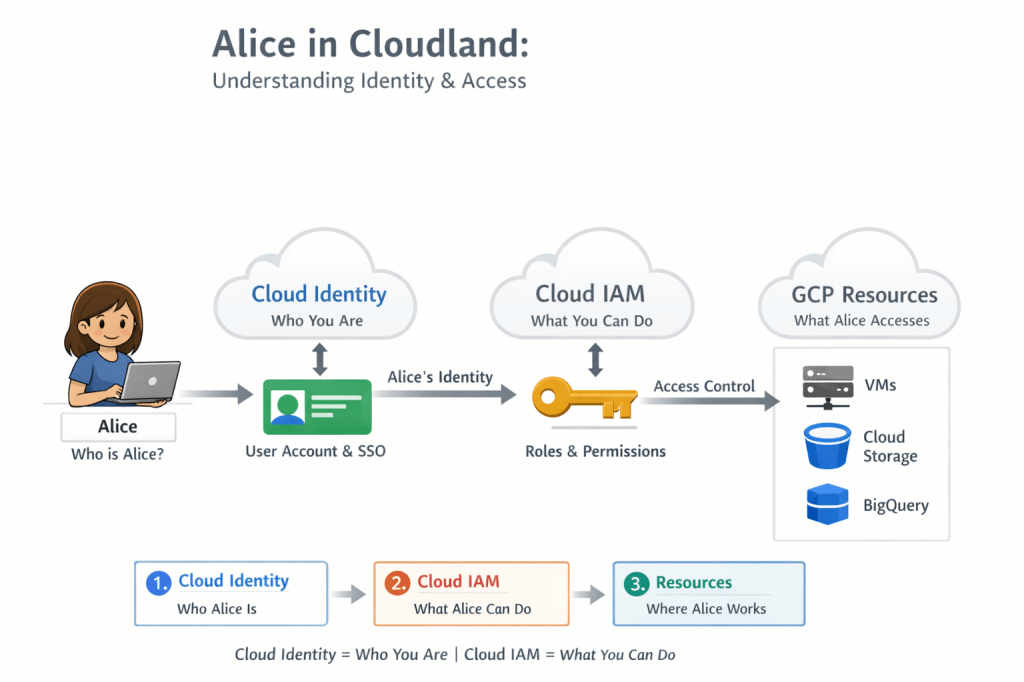
Cloud Identity is Google’s service for managing identities—the people who are allowed to access your Google Cloud environment.
It creates and manages digital identities (users and groups).
It answers the question: “Who are you?”
It answers the question:
“Who is Alice?”
What Cloud Identity does:
- Creates and manages users and groups
- Enforces Multi-Factor Authentication (MFA / 2-Step Verification)
- Provides Single Sign-On (SSO) for cloud and SaaS apps
- Integrates with Active Directory / LDAP for enterprises.
Users and Groups
Cloud Identity manages two main identity types:
- Users: Individual people (e.g.,
XXXXX@company.com) - Groups: Collections of users (e.g.,
gcp-developers@company.com)
Why Groups Are a Best Practice
Managing permissions through groups is the recommended and scalable approach:
- Permissions are assigned once to a group.
- Users inherit permissions by being added to the group.
- Removing a user from the group instantly revokes access.
This prevents human error, simplifies access management, and improves security. Managing users individually does not scale and increases risk.
🛂 Step 2: Cloud IAM – What Alice Can Do
Once Alice is identified, she wants to perform actions in Google Cloud.
Cloud IAM (Identity and Access Management) answers the question:
“What is Alice allowed to do?”
What Cloud IAM does:
- Grants roles (Owner, Editor, Viewer, Predefined, Custom).
- Controls access to projects, folders, and resources.
- Enforces permissions on VMs, storage buckets, databases, BigQuery datasets, and more.
💡 Exam Tip: IAM focuses on authorization — controlling what actions users or groups can perform on GCP resources.
🔄 How Cloud Identity & IAM Work Together
[Cloud Identity] --> Alice’s identity | v[Cloud IAM] -------> Roles & permissions | v[GCP Resources] --> VMs, Buckets, Databases, etc.
- Cloud Identity = Who you are
- Cloud IAM = What you can do
- Resources = Where actions happen
Analogy:
- Cloud Identity = Alice’s ID card
- IAM = Permissions printed on her ID card
- Resource = Doors and tools she can access
To wrap it all up, every action in Google Cloud starts with a simple question: Who are you, and what are you allowed to do?
Cloud Identity answers the first. Cloud IAM answers the second.
Together, they act as the gatekeepers of your cloud environment—making sure the right people get the right access at the right time. When used correctly, they don’t just secure your system—they simplify it.
So whether you’re onboarding your first user or managing thousands, remember Alice:
She can only open doors that her identity is trusted for—and her permissions allow.
 DBzTech-Technology Dossier
Leave a comment