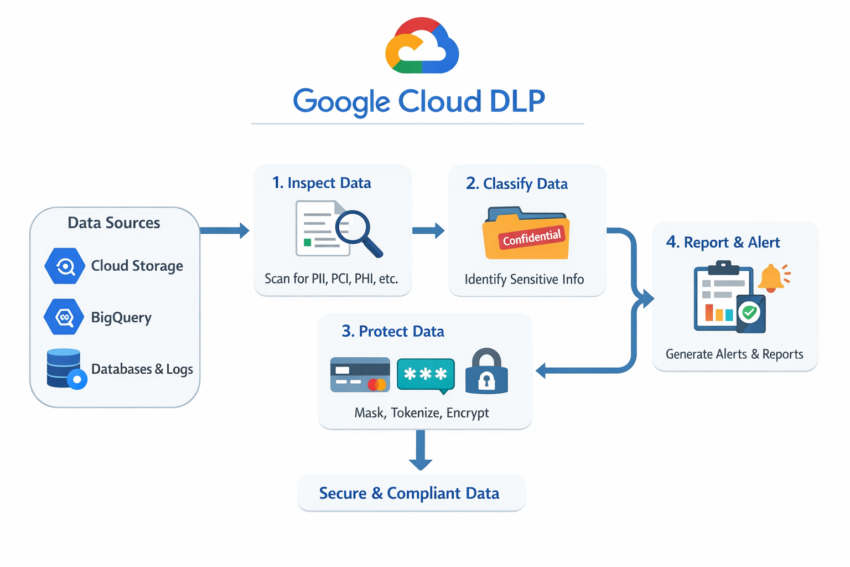
Google Cloud DLP (Sensitive Data Protection)
Google Cloud DLP, now part of Sensitive Data Protection, is a fully managed Google Cloud service that helps organizations discover, classify, and protect sensitive data across cloud and on-premises environments.
It automatically identifies sensitive information such as personal data, credit card numbers, and health records, then masks or transforms it to prevent data exposure.
What Does Cloud DLP Do?
Cloud DLP provides four key capabilities:
1. Discover Sensitive Data
It scans data stored in:
- Cloud Storage (PDFs, images, documents, text files)
- BigQuery
- Cloud SQL
- Application logs, emails, and Pub/Sub streams
2. Classify Data
Cloud DLP uses built-in infoTypes to detect and label sensitive information, including:
| Type | Examples |
|---|---|
| PII | Names, addresses, SSNs, passports |
| PCI | Credit card numbers, CVVs |
| PHI | Medical records, insurance IDs |
| Custom Types | Internal IDs, custom patterns, regex matches |
3. Protect Data
Once sensitive data is identified, Cloud DLP can:
- Mask data
- Redact (remove) data
- Encrypt or tokenize data
- Generalize values into ranges
4. Monitor & Report
It generates findings, logs activity, and can trigger alerts for compliance monitoring.
How Cloud DLP Works
Data Source
     ↓
Inspection
     ↓
Classification
     ↓
Transformation
     ↓
Reporting & Alerts
Step 1: Inspection
Scans data using on-demand or scheduled jobs.
Step 2: Classification
Identifies sensitive information using built-in infoTypes and confidence scores.
Step 3: Transformation
Applies masking, redaction, tokenization, or other de-identification methods.
Step 4: Reporting
Stores findings, updates dashboards, and sends alerts when needed.
Common Data Protection Techniques
Redaction
Completely removes sensitive values.
Example:SSN: 123-45-6789 → [REDACTED]
Masking
Hides part of the value.
Example:123-45-6789 → XXX-XX-6789
Tokenization
Replaces data with a secure token while preserving format.
Example:4111-1111-1111-1111 → TKN-9482-XXXX
Bucketing
Groups values into ranges.
Example:Age 27 → Age 20–30
Real-World Example
A healthcare company stores customer data in BigQuery.
Business analysts need access to analytics, but must not see patient IDs, emails, or credit card numbers.
Using Cloud DLP, the company can:
- Automatically identify sensitive fields
- Mask or encrypt sensitive data
- Allow analysts to run reports safely
- Maintain HIPAA compliance
Sample Exam Question
Scenario: A company is moving customer data to BigQuery. Analysts need to analyze trends but must not see customer SSNs or full names.
Which solution requires the least operational effort?
A. Write a custom Python script to remove columns
B. Use Cloud DLP to mask SSNs and names
C. Encrypt the entire BigQuery dataset with CMEK
D. Store data in Cloud Storage and restrict access with IAM
✅ Answer: B
Why?
Cloud DLP is specifically designed to discover and mask sensitive data automatically, allowing analysts to work with data safely while maintaining compliance. Encryption and IAM protect data storage and access, but they do not prevent authorized users from seeing sensitive information once access is granted.
Exam Tip
Cloud DLP = Find + Classify + Mask Sensitive Data
If a question involves protecting PII while still allowing data analysis, Cloud DLP (Sensitive Data Protection) is usually the best answer.