What Is PROC SQL in SAS?
When working with SAS on the mainframe, one of the most powerful tools available is PROC SQL. Understanding how to use PROC SQL on Mainframe systems can help you query, join, filter, and summarize large datasets efficiently. Unlike traditional DATA steps or sorting workflows, PROC SQL allows you to manipulate data using SQL syntax, often reducing the number of processing steps required.
In this guide, you’ll learn how to use PROC SQL on Mainframe environments, including basic syntax, join operations, performance considerations, and best practices for working with SAS on z/OS.
Example: Joining Two Files Using PROC SQL
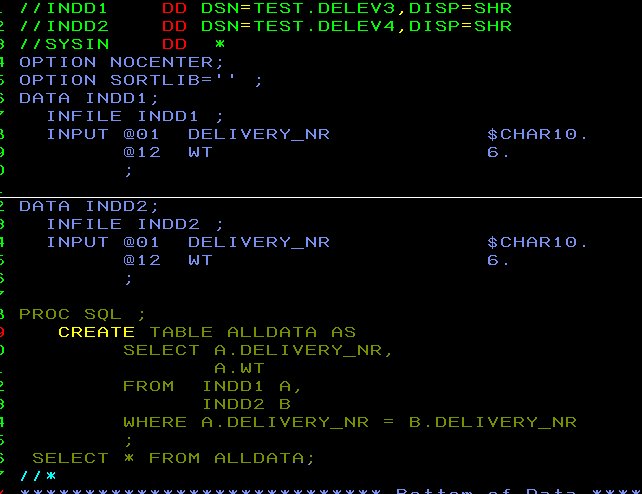
To begin, consider two input files that contain a common field named DELIVERY_NR. Using PROC SQL, we can create internal SAS tables and perform a join operation based on the common key.
The output will contain matching records found in both datasets.
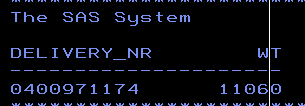
The output will be the common record in two record sets:
Common Use Cases for PROC SQL on a Mainframe
Data Cleansing and Deduplication
Use DISTINCT, GROUP BY, and conditional expressions to eliminate duplicate records and standardize data without multiple DATA step operations.
Joining Multiple Datasets
PROC SQL can combine SAS datasets, flat files, and other data sources without requiring separate sort and merge steps.
Summarizing High-Volume Data
Functions such as SUM, COUNT, AVG, MIN, and MAX allow large datasets to be aggregated efficiently for reporting and analysis.
Creating Views and Reporting Tables
Using CREATE VIEW enables you to define reusable query logic without physically creating additional datasets, helping conserve storage resources.
Conclusion
If you’re working with SAS on a mainframe (z/OS), mastering PROC SQL gives you a powerful tool for querying, joining and manipulating large datasets efficiently. By reducing the need for multiple steps (such as sorting, merging, filtering separately), you can streamline your batch workflows and save on mainframe resources.