
Having a clear understanding of Zoned Decimal format is essential before diving into Packed Decimal (COMP-3) format in COBOL.
By default, COBOL stores numeric data in Zoned Decimal (DISPLAY) format, where every single digit consumes an entire byte of storage. COMP-3 radically changes this by stripping unnecessary data overhead and packing multiple digits into a single byte.
The Architecture: How Space Saving is Achieved
To understand how COMP-3 saves space, we first need to examine the structure of a computer byte. A computer stores each byte as 8 bits and divides it into two 4-bit halves known as nibbles
- The Zone Nibble (The high-order 4 bits)
- The Digit Nibble (The low-order 4 bits)
In a standard DISPLAY format, the Zone Nibble is largely wasted, storing a generic hex value (F) for every digit.
COMP-3 eliminates this waste. It completely strips out the useless zone portions. Because a numeric digit requires only 4 bits of binary data, COMP-3 maximizes storage efficiency by packing two numeric digits into a single byte—one in the left nibble and one in the right nibble.
The only exception to this rule occurs in the rightmost (low-order) byte. The rightmost byte holds the final numeric digit in its left nibble, and reserves its right nibble exclusively for the operational Sign value (C or F for positive, D for negative).
For example, consider the negative number – 38516.
1. The Standard Way: Zoned Decimal (DISPLAY)
In a standard text field, each digit gets its own byte. COBOL pairs each digit with a zone value and stores the sign in the zone portion of the rightmost byte
| Digit | 3 | 8 | 5 | 1 | 6 (Negative) |
| Hex Representation | F3 | F8 | F5 | F1 | D6 |
| Bytes Consumed | Byte 1 | Byte 2 | Byte 3 | Byte 4 | Byte 5 |
Total Footprint: 5 Bytes
2. The Optimized Way: Packed Decimal (COMP-3)
When you declare this field as COMP-3, COBOL strips away all those unnecessary F zones. It pairs up the digits two-by-two, shifting them into the open nibbles, and drops the negative sign indicator (D) into the final slot:
| Byte Position | Byte 1 | Byte 2 | Byte 3 |
| Left Nibble (Digit) | 3 | 5 | 6 |
| Right Nibble (Digit/Sign) | 8 | 1 | D (Sign) |
| Resulting Hex Value | 38 | 51 | 6D |
Total Footprint: 3 Bytes
Pictorially
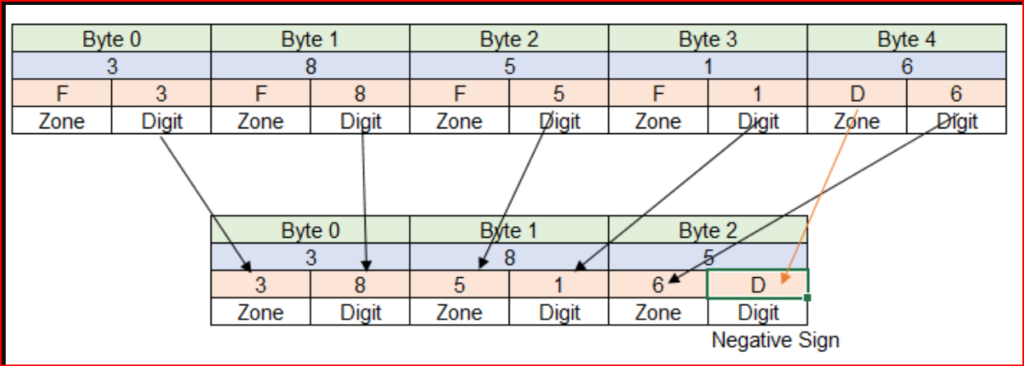
Before COBOL performs arithmetic operations, it typically converts numeric fields to COMP-3 format. As a result, the program can process calculations more efficiently and accurately.This ensures accurate arithmetic operations in COBOL programs.
However, Packed Decimal (COMP-3) data is not human-readable, so it should not be used for printing output. Each storage position represents digits in a compact format, meaning direct printing of packed decimals will produce unreadable characters.
Understanding zoned decimal vs packed decimal formats is crucial for COBOL developers to optimize numeric field storage and ensure efficient data processing in legacy systems