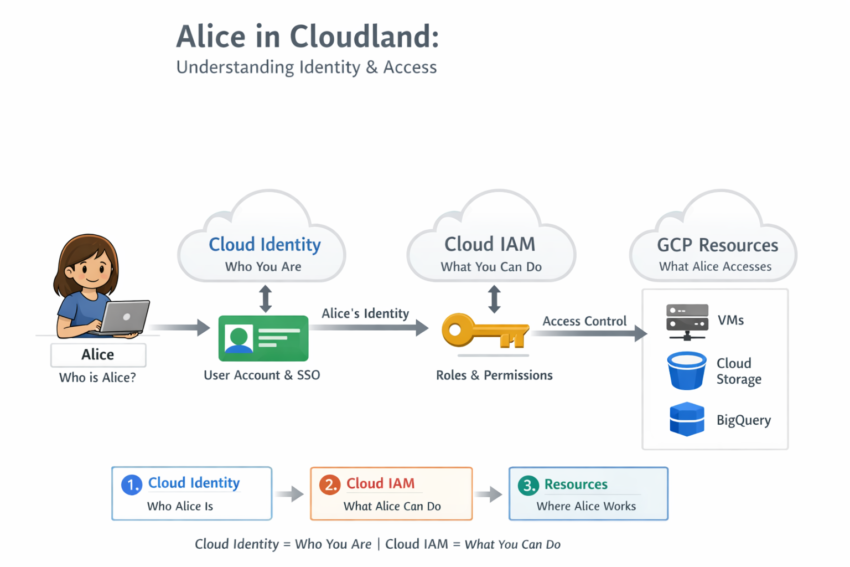
Cloud Identity vs Cloud IAM: Understanding Identity and Access Management in Google Cloud
Cloud Identity and Cloud IAM are two core Google Cloud services that work together to secure your cloud environment. While Cloud Identity manages users and groups, Cloud IAM controls what those users can access and what actions they can perform.
Understanding the difference between Cloud Identity and Cloud IAM is essential for Google Cloud administrators, security teams, and certification candidates. Although these services are closely related, they serve different purposes.
Let’s use a simple story to understand how they work together.
Meet Alice🧍
Imagine Alice has just joined CloudCorp and needs access to the company’s Google Cloud environment.
Before Alice can work with cloud resources, CloudCorp must answer two important questions:
- Who is Alice?
- What is Alice allowed to do?
The first question is answered by Cloud Identity.
The second question is answered by Cloud IAM.
Together, these services ensure that only authorized users can access the right resources at the right time.
So, What Is Cloud Identity?
Cloud Identity is Google’s identity management service for users and groups.
In simple terms, it creates and manages the digital identities that can access your Google Cloud environment. Therefore, Cloud Identity focuses on authentication and identity management.
Cloud Identity answers the question:
“Who is Alice?”
Key Features of Cloud Identity
Cloud Identity provides several important capabilities:
- Creates and manages users
- Creates and manages groups
- Enforces Multi-Factor Authentication (MFA)
- Provides Single Sign-On (SSO)
- Integrates with Active Directory and LDAP
- Supports centralized identity management
As a result, organizations can securely manage thousands of users from a single platform.
Users and Groups in Cloud Identity
In practice, Cloud Identity manages two primary identity types:
Users
Users represent individual people within an organization.
Examples:
Each user receives a unique identity that can be authenticated and authorized within Google Cloud.
Groups
Groups are collections of users.
Examples:
Instead of managing permissions for every individual user, administrators can manage access through groups.
Why Using Groups Is a Best Practice
Managing permissions through groups is the recommended and scalable approach.
For example, imagine an organization with 100 developers.
Rather than assigning permissions to each developer individually, administrators can create a Developers group and assign permissions only once.
Users then inherit permissions automatically by becoming members of the group.
This approach offers several advantages:
- Simplifies permission management
- Reduces administrative effort
- Minimizes human error
- Improves security
- Scales efficiently as teams grow
Furthermore, removing a user from a group instantly removes the permissions inherited from that group.
As a result, access management becomes easier and more secure.
And What’s Cloud IAM? Defines What Alice Can Do
After Alice’s identity has been established, she needs permission to work with Google Cloud resources.
This is where Cloud IAM (Identity and Access Management) comes into play.
While Cloud Identity answers “Who is Alice?”, Cloud IAM answers:
“What is Alice allowed to do?”
Therefore, IAM focuses on authorization rather than authentication.
Key Features of Cloud IAM
Cloud IAM provides several important capabilities:
- Assigns IAM roles
- Controls access to resources
- Enforces permissions
- Supports least-privilege access
- Enables centralized access management
- Allows custom and predefined roles
Consequently, organizations can control exactly what actions users and groups are allowed to perform.
What Resources Can IAM Control?
Cloud IAM can manage access to virtually every Google Cloud resource, including:
- Virtual Machines (VMs)
- Cloud Storage buckets
- Databases
- BigQuery datasets
- Kubernetes clusters
- Networking resources
- Serverless services
For example, one user may only have permission to view a storage bucket, while another can create, modify, and delete objects.
Understanding IAM Roles
IAM permissions are typically granted through roles.
Common role types include:
Basic Roles
- Owner
- Editor
- Viewer
Predefined Roles
Google provides predefined roles for specific services and job functions.
Examples include:
- Storage Admin
- BigQuery Admin
- Compute Admin
Custom Roles
Organizations can also create custom roles containing only the permissions they require.
As a result, administrators can implement the principle of least privilege more effectively.
Exam Tip
Remember:
Authentication = Cloud Identity = Who are you?
Authorization = Cloud IAM = What are you allowed to do?
This distinction appears frequently in Google Cloud certification exams, including Associate Cloud Engineer and Professional Cloud Architect.
How Cloud Identity and Cloud IAM Work Together
Although Cloud Identity and Cloud IAM serve different purposes, they work together to secure Google Cloud environments.
The process typically looks like this:
| Component | Purpose |
|---|---|
| Cloud Identity | Manages identities such as users and groups |
| Cloud IAM | Assigns roles and permissions |
| Google Cloud Resources | Services users interact with |
The workflow is simple:
- Cloud Identity verifies who Alice is.
- Cloud IAM checks which permissions Alice has.
- Google Cloud resources enforce those permissions.
Therefore, access is granted only when both identity and authorization requirements are met.
A Simple Analogy
A helpful way to remember the difference is through an office building analogy.
Cloud Identity = Alice’s ID Card
The ID card proves Alice’s identity.
Cloud IAM = Permissions on the ID Card
The permissions determine which rooms Alice can enter and which actions she can perform.
Google Cloud Resources = Rooms and Tools
The rooms represent resources such as virtual machines, storage buckets, databases, and applications.
Consequently, even if Alice has an ID card, she cannot access every room unless her permissions allow it.
Frequently Asked Questions
What is Cloud Identity in Google Cloud?
Cloud Identity is Google’s identity management service that manages users, groups, authentication, MFA, and Single Sign-On.
What is Cloud IAM?
Cloud IAM (Identity and Access Management) controls what actions users and groups can perform on Google Cloud resources.
What is the difference between Cloud Identity and Cloud IAM?
Cloud Identity manages who users are, while Cloud IAM manages what those users can do.
In other words:
- Cloud Identity = Authentication
- Cloud IAM = Authorization
Can Cloud IAM work without Cloud Identity?
No. IAM permissions can only be assigned to authenticated identities. Therefore, a user or group must first exist before permissions can be granted.
Why are groups recommended instead of assigning permissions to individual users?
Groups simplify access management, reduce errors, and scale much more effectively in large organizations.
Conclusion
To wrap it all up, every action in Google Cloud starts with two fundamental questions:
Who are you?
What are you allowed to do?
Together, Cloud Identity and Cloud IAM act as the gatekeepers of your cloud environment. They ensure that the right people receive the right level of access at the right time.