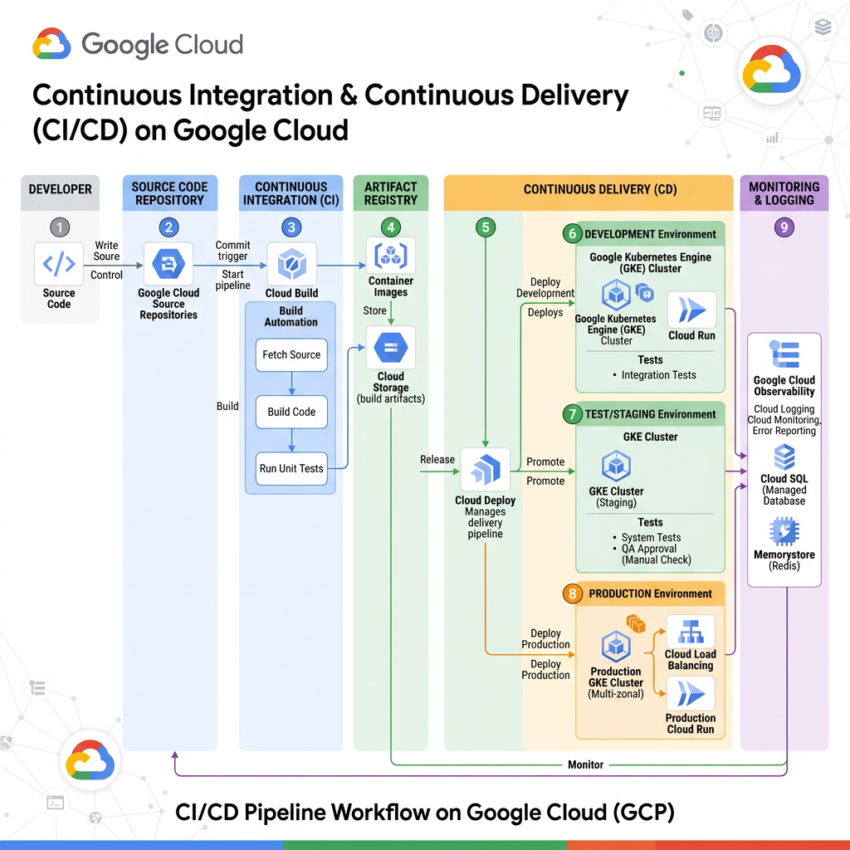
CI/CD Pipeline on Google Cloud: From Code Commit to Cloud Run
Building and deploying applications manually can be slow and error-prone. That’s why many teams use a CI/CD pipeline on Google Cloud to automate software delivery.
Meet Alex, a developer who has just completed a new feature. The code works perfectly on a local machine. However, the next challenge is deploying it safely, quickly, and reliably to production.
This is where a CI/CD pipeline on Google Cloud comes in.
Step 1: Commit Code to the Repository
Alex pushes the code to a Git repository using Cloud Source Repositories, the first Google Cloud service in this journey.
As soon as the commit is pushed, an automated pipeline is triggered. No manual file transfers are required. Instead, the deployment process starts automatically.
Step 2: Cloud Build Handles Continuous Integration
Next, Cloud Build takes care of the Continuous Integration (CI) process.
Cloud Build performs several important tasks:
- Builds the application
- Runs unit tests
- Runs integration tests
- Creates a Docker container image
Most importantly, if any test fails, the pipeline stops immediately. As a result, broken code never reaches production.
Step 3: Store Artifacts in Artifact Registry
After a successful build, the container image is stored in Artifact Registry.
Artifact Registry acts as a secure storage location for application artifacts and container images.
Key benefits include:
- Version control
- Traceability
- Reproducibility
- Secure access management
At this stage, the application is packaged and ready for deployment.
Step 4: Spinnaker Manages Continuous Delivery
Now, Spinnaker handles the Continuous Delivery (CD) process.
Spinnaker deploys application versions across multiple environments, such as:
- Development
- Staging
- Production
In addition, Spinnaker supports advanced deployment strategies:
- Blue/Green deployments
- Canary releases
- Rolling updates
Because of these capabilities, Alex can release updates with minimal risk and no downtime.
Step 5: Deploy to Cloud Run
Finally, Spinnaker deploys the application to Cloud Run.
Cloud Run offers several advantages:
- Automatically scales based on traffic
- Scales to zero when idle
- Eliminates infrastructure management
- Supports containerized workloads
As a result, Alex’s application is now running in production and available to users.
CI/CD Pipeline on Google Cloud Architecture
The complete deployment flow looks like this:
Developer → Cloud Source Repositories → Cloud Build → Artifact Registry → Spinnaker → Cloud Run
Each service plays a specific role in moving code from development to production.
Why Use Spinnaker in a Single-Cloud Environment?
Although Spinnaker is often associated with multi-cloud deployments, it also provides significant value in a single-cloud architecture.
Benefits include:
- Advanced deployment strategies
- Automated environment promotion
- Fast rollbacks
- Pipeline-as-code capabilities
- Complete deployment visibility
Therefore, Spinnaker helps teams deploy software with greater confidence and reliability.
Google Cloud Digital Leader Exam Tip
If you are preparing for the Google Cloud Digital Leader certification, remember these core services:
Key CI/CD Tools
- Cloud Build → Continuous Integration (CI)
- Artifact Registry → Secure artifact storage
- Spinnaker → Continuous Delivery (CD)
- Cloud Run, Compute Engine, or App Engine → Deployment targets
Remember the CI/CD Flow
Code Commit → Cloud Build → Artifact Registry → Spinnaker → Deployment
Common Exam Concepts
- Cloud Build automates building and testing.
- Artifact Registry stores container images and packages securely.
- Spinnaker manages deployment strategies and releases.
- Cloud Run provides a serverless platform for running containers.
Understanding how these services work together is essential for both real-world deployments and certification exams.
Conclusion
A CI/CD pipeline on Google Cloud enables developers to automate software delivery from code commit to production deployment.
By combining Cloud Source Repositories, Cloud Build, Artifact Registry, Spinnaker, and Cloud Run, teams can build, test, store, and deploy applications efficiently while maintaining reliability and security.
This automated workflow helps developers deliver features faster and with greater confidence.