COBOL program connection refers to how COBOL applications running on IBM z/OS mainframes connect with subsystems such as CICS, IMS, and DB2. This connection allows programs to process transactions, access databases, and handle both online and batch workloads efficiently.
📌 Online — such as interactive transactions managed by systems like CICS (Customer Information Control System),
📌 Batch — background processing jobs.
But to truly understand how a COBOL program is connected — whether to CICS, IMS, or DB2 — IBM provides a built-in way to check this using the SYSPLSYSTEM catalog table.
🔍 Why It Matters
Mainframe environments run multiple subsystems:
- CICS — handles online transaction processing for COBOL programs and integrates directly with DB2 databases.
- IMS — another transaction manager and hierarchical database system.
- DB2 — a relational database management system used by enterprise COBOL applications.
These integrations enable COBOL applications to execute business logic while accessing data reliably and efficiently. Understanding how a program is “attached” helps developers troubleshoot, optimize, and manage workloads on z/OS.
✅ How to Identify What Your COBOL Program Is Connected To
IBM stores connection info in the SYSIBM.SYSPLSYSTEM table. This table lists details about system bindings for programs — including whether they’re enabled under CICS, IMS, or DB2.
To check a program’s connection type, run a simple SQL query:
SELECT * FROM SYSIBM.SYSPLSYSTEM
WHERE NAME='PXXX';
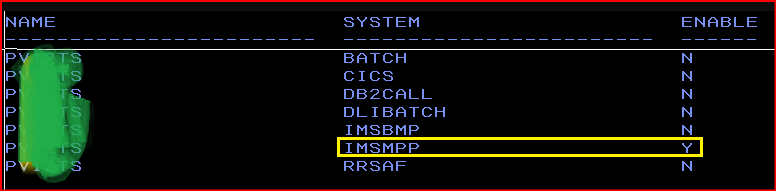
After running the query, we see that for this program the program type is IMSMPP and it is enabled meaning the plan is actively enabled and allowed to execute in this environment. So this program will behave as MPP program under IMS environment.
✅ If the SYSTEM column shows CICS, then your COBOL runs under the CICS transaction environment.
✅ If it shows IMS, it means the program works with IMS transaction or database services.