SAS in Mainframe environments provides a powerful way to process, analyze, and report on large volumes of enterprise data. While many professionals associate SAS with Windows or UNIX platforms, SAS is fully supported on IBM z/OS mainframes and is widely used for data analytics, reporting, and database integration.
If you are learning SAS in Mainframe, understanding the DATA step and PROC step is the first step toward building efficient SAS programs.
What is SAS in Mainframe?
SAS in Mainframe allows organizations to perform data processing and analytics directly on z/OS systems. SAS can read data from sequential files, VSAM files, DB2 tables, Oracle databases, and other enterprise data sources.
A typical SAS program in a mainframe environment consists of two major components:
- DATA Step
- PROC Step
Together, these components form the foundation of almost every SAS program.
DATA Step in SAS Mainframe
The DATA step is used to read, structure, and prepare data for processing. During this step, SAS reads data from an input source and creates a SAS dataset.
Input sources may include:
- Sequential files
- Mainframe datasets
- DD statements in JCL
- Instream data
- Database tables
The DATA step defines the layout of the incoming data, similar to how a COBOL copybook describes record structures.
Example of DATA Step
DATA TEST;
INFILE INDD;
INPUT
    @1 DELIVERY_NR $10.
    @11 WT          6.;
RUN;
In this example:
DATA TESTcreates a SAS dataset named TEST.INFILE INDDreferences the input dataset defined in JCL.INPUTdefines the layout of the input records.DELIVERY_NRandWTare variables extracted from the input file.
Understanding the INPUT Statement
The INPUT statement is one of the most important parts of the DATA step.
It defines:
- Starting position of each field
- Variable name
- Data type
- Length of the field
For example:
@1 DELIVERY_NR $10.
@11 WT 6.
This tells SAS to:
- Read DELIVERY_NR starting at position 1
- Read WT starting at position 11
PROC Step in SAS Mainframe
PROC stands for Procedure. SAS provides hundreds of built-in procedures that perform common tasks without requiring complex programming.
Common PROC steps include:
- PROC PRINT
- PROC SORT
- PROC MEANS
- PROC FREQ
- PROC REPORT
These procedures are optimized and save developers significant coding effort.
Pictorially the flow will be like

PROC PRINT Example
After creating the TEST dataset, you can display its contents using PROC PRINT.
PROC PRINT DATA=TEST;
RUN;
The PROC PRINT statement displays all observations and variables stored in the SAS dataset.
The output typically includes:
- Observation number (OBS)
- Variable names
- Data values
This output is usually written to SASLIST and can be viewed in the JES spool.
Running SAS in Mainframe Through JCL
To execute SAS in Mainframe, SAS is typically invoked through JCL.
A JCL job contains:
- EXEC SAS statement
- Input DD statements
- Output DD statements
- SYSIN containing the SAS program
//S01      EXEC SAS
//SYSOUT   DD  SYSOUT=*
//INDD     DD DSN=TEST.DELEVY,DISP=SHR
//SYSIN    DD  *
OPTION NOCENTER;
OPTION SORTLIB='' ;
DATA IP1;
  INFILE INDD ;
  INPUT @01  DELIVERY_NR            $CHAR10.
        @12  WT                     6.
        ;
PROC PRINT DATA = IP1;
The Output will look like:
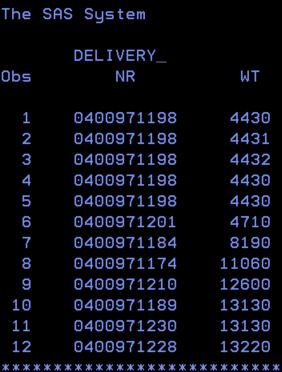
The SYSIN DD statement contains both DATA and PROC steps that SAS executes during the job run.
This integration allows SAS to work seamlessly with traditional mainframe datasets and batch processing workflows.
Key SAS Terminology in Mainframe
Understanding common SAS terminology is important when working with SAS on z/OS.
SAS Log
The SAS Log records:
- Executed statements
- Error messages
- Warnings
- Processing statistics
The SAS Log is the first place to check when troubleshooting a SAS job.
Dataset
A SAS dataset is a structured collection of data created or referenced by a DATA step.
Observation
An observation represents a single row or record within a SAS dataset.
Variable
A variable represents a column within a SAS dataset and contains related values.
Benefits of SAS in Mainframe
Organizations continue to use SAS in Mainframe environments because of several advantages:
- High-performance batch processing
- Integration with enterprise data sources
- Efficient reporting capabilities
- Scalability for large datasets
- Reduced development effort through built-in procedures
- Reliable execution on z/OS systems
These features make SAS a popular choice for analytics and reporting in large enterprises.
Summary
Learning SAS in Mainframe starts with understanding the DATA step and PROC step.
The DATA step reads and structures data from input sources. The PROC step uses built-in SAS procedures to analyze, manipulate, sort, and report on that data. Together, these two components form the foundation of every SAS application running on z/OS.
Once you master these concepts, you can move on to advanced topics such as PROC SORT, PROC MEANS, PROC REPORT, data merging, and enterprise reporting solutions.
Next Steps
In the next article, we will explore PROC SORT in SAS Mainframe environments and learn how multiple PROC steps can be combined within a single JCL workflow to create powerful data-processing applications.