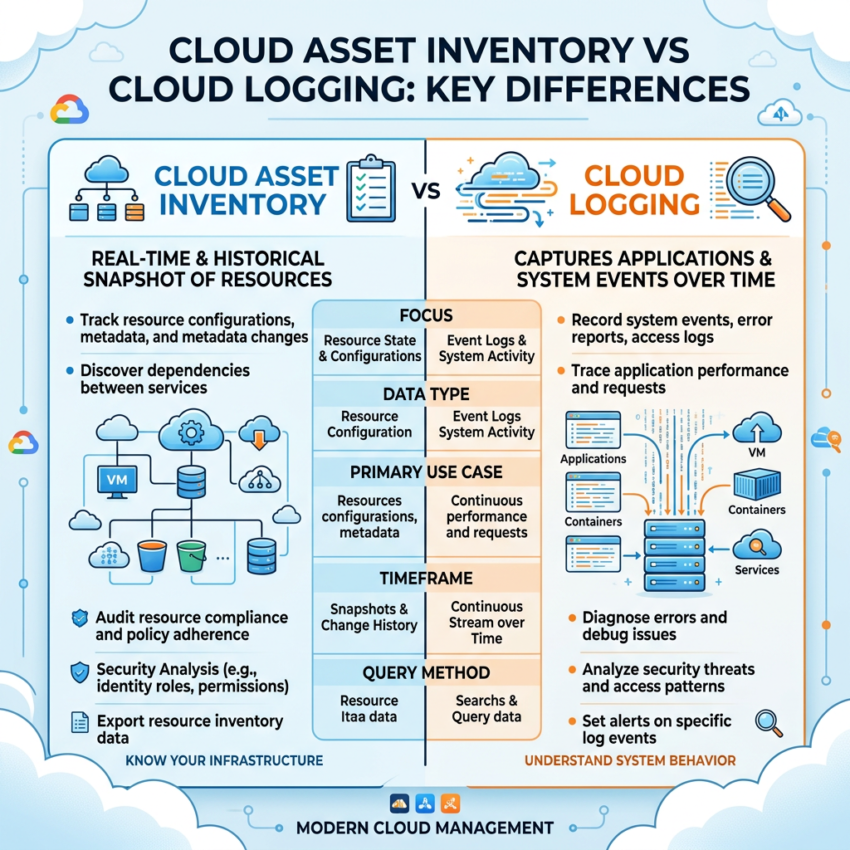
Google Cloud Asset Inventory Explained (With Cloud Logging Comparison)
Google Cloud Asset Inventory helps organizations track, audit, and manage cloud resources across their environments. As infrastructure grows, maintaining visibility becomes increasingly difficult. What starts with a few virtual machines and storage buckets can quickly scale into hundreds or thousands of assets spread across multiple projects.
That creates an important question:
How do you track and understand everything running in Google Cloud?
The answer is Cloud Asset Inventory.
What Is Cloud Asset Inventory?
Cloud Asset Inventory is a fully managed Google Cloud service that provides a centralized and near real-time view of your cloud resources.
It automatically helps teams:
- Discover resources across an organization
- Index assets across projects and folders
- Organize metadata for faster search and filtering
- Maintain visibility into infrastructure changes
This makes resource management easier as environments scale.
Why Cloud Asset Inventory Matters
Visibility is essential in large cloud environments. Without a centralized inventory, it becomes difficult to understand what resources exist, who owns them, and how they change over time.
Cloud Asset Inventory helps teams:
- ✅ Maintain a single source of truth
- ✅ Review infrastructure configurations
- ✅ Support security and compliance requirements
- ✅ Improve governance across projects
- ✅ Quickly answer: “What resources do I have?”
Supported asset examples include:
- Virtual machines (
compute.instance) - Storage buckets (
storage.bucket) - IAM policies
- Networking resources
Key Features
Search and Filtering
Cloud Asset Inventory allows teams to quickly locate resources across large environments.
You can search using:
- Resource type filters
- Metadata queries
- Organization-wide search
Example:
- Filter
compute.instance→ View all virtual machines - Filter
storage.bucket→ View all storage buckets
This improves cloud asset tracking and operational efficiency.
Historical Tracking
One of the most valuable capabilities is the ability to review historical states.
Instead of only showing the current environment, the service helps teams understand how infrastructure changes over time.
Historical visibility includes:
- Configuration changes
- IAM updates
- Resource state history
This becomes especially useful for:
- Auditing
- Troubleshooting
- Compliance reporting
Cloud Asset Inventory vs Cloud Logging
Understanding the difference between these services is important for both daily operations and certification preparation.
Core Difference
Cloud Asset Inventory → Shows resource state
(What exists and how it changed)
Cloud Logging → Shows events and activity
(What happened, when it happened, and who performed the action)
Example: Virtual Machine Machine Type Change
Suppose a virtual machine was updated.
Using Cloud Asset Inventory
Yesterday → e2-medium
Today → e2-standard-4
You can:
- Compare configurations
- Review infrastructure history
- Track state changes over time
Using Cloud Logging
User → [email protected]
Action → compute.instances.setMachineType
Time → 10:32 AM
You can:
- Identify who made the change
- See when it occurred
- Review the API request details
Cloud Asset Inventory vs Cloud Logging: Comparison Table
| Feature | Cloud Asset Inventory | Cloud Logging |
|---|---|---|
| Focus | Resource state | Events and actions |
| Answers | What resources exist? | What happened? |
| History | Configuration tracking | Event timeline |
| IAM Visibility | Policy state tracking | Change activity |
| Best Use Case | Auditing and inventory | Debugging and security |
Easy Way to Remember
Use this memory trick:
Asset Inventory = What it is
Cloud Logging = What happened
This distinction helps teams choose the right auditing approach.
When Should You Use Cloud Asset Inventory?
Use this service when you need to:
- List resources across projects
- Audit IAM policies and configurations
- Track infrastructure changes
- Improve compliance visibility
- Strengthen GCP resource management
Final Thoughts
Cloud Asset Inventory is a foundational service for visibility and governance in Google Cloud.
It provides a reliable way to understand infrastructure state, review historical changes, and simplify auditing.
When combined with Cloud Logging:
- Asset Inventory shows the state of your infrastructure
- Cloud Logging shows the events behind those changes
Together, they provide a complete view of your cloud environment.