Imagine this scenario.
Your team has just finished building a brand-new application. The code passed all tests, the container image was pushed successfully, and you’re ready to deploy it to production on Google Kubernetes Engine (GKE).
Everything looks perfect.
However, hidden inside that container image is a small piece of malicious code. Once deployed, it quietly starts mining cryptocurrency and opens a backdoor into your environment.
You didn’t see it coming.
Now your cloud infrastructure is compromised.
This is exactly the type of threat that Binary Authorization and Container Threat Detection are designed to prevent and detect in Google Cloud. Together, these services help secure container workloads before deployment and during runtime.
What Are Binary Authorization and Container Threat Detection?
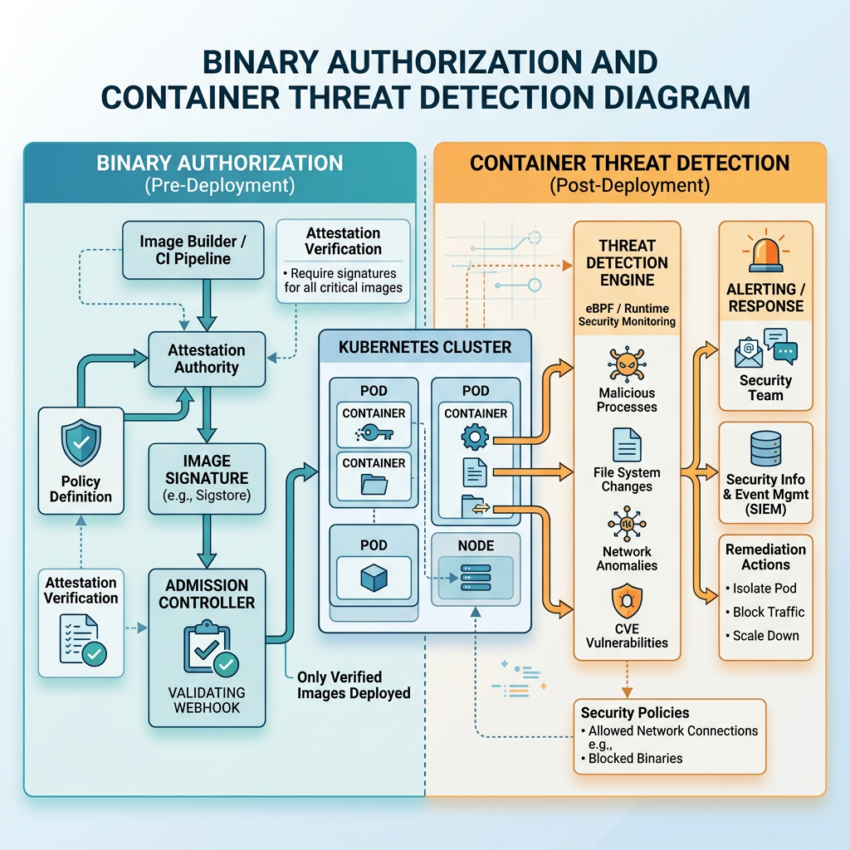
Binary Authorization and Container Threat Detection provide two layers of protection for containerized workloads running on GKE.
- Binary Authorization ensures that only trusted and approved container images can be deployed.
- Container Threat Detection continuously monitors running containers for suspicious or malicious behavior.
Together, they create a strong defense-in-depth security strategy for Kubernetes environments.
Step 1: Prevent Untrusted Images with Binary Authorization
In Google Cloud, Binary Authorization acts like a security guard standing at the entrance of your GKE cluster.
Before any container image is allowed to run, Binary Authorization asks a simple question:
“Is this image trusted, verified, and approved?”
Only container images that satisfy your organization’s security requirements are allowed into production. Everything else is blocked automatically.
How Binary Authorization Works
Binary Authorization enforces deployment policies that require container images to be:
- Signed by approved attestors
- Scanned and verified before deployment
- Explicitly trusted by the security team
If an image fails to meet these requirements, GKE refuses to deploy it.
Why Binary Authorization Matters
Many modern attacks originate from the software supply chain.
For example:
- A developer may accidentally use an unapproved base image.
- A container image could be modified after it is built.
- An attacker could inject malicious code before deployment.
Binary Authorization helps prevent:
- Deployment of malicious container images
- Use of unapproved base images
- Supply-chain attacks targeting container workloads
Binary Authorization Deployment Flow
The process typically follows these steps:
- Your team builds a container image.
- The image is pushed to Artifact Registry.
- A scanner or CI/CD pipeline validates the image.
- The image is digitally signed.
- Binary Authorization verifies the signature during deployment.
- Only approved and verified images are deployed to GKE.
As a result, Google Cloud verifies that an image is trustworthy before it ever runs.
Step 2: Monitor Running Containers with Container Threat Detection
Even with strong deployment controls, security risks can still emerge after deployment.
This is where Container Threat Detection becomes essential.
Container Threat Detection is part of Security Command Center and continuously monitors running container workloads for suspicious activity.
Instead of focusing on what gets deployed, it focuses on what happens after deployment.
What Container Threat Detection Monitors
Container Threat Detection analyzes:
- Processes running inside containers
- File system activity
- Network connections
- Privilege escalation attempts
Because of this visibility, it can identify behaviors that indicate an active attack.
Threats Detected by Container Threat Detection
The service looks for indicators such as:
- Cryptocurrency mining activity
- Reverse shells
- Malware execution
- Container escape attempts
Why Container Threat Detection Matters
Even trusted container images can become compromised.
For example:
- A new vulnerability may be discovered after deployment.
- An attacker may gain access to a running workload.
- Malware may execute inside an otherwise legitimate container.
Container Threat Detection helps security teams by:
- Detecting active attacks
- Providing near real-time alerts
- Accelerating incident response
While Binary Authorization protects the front door, Container Threat Detection monitors everything happening inside the building.
Binary Authorization and Container Threat Detection: Defense-in-Depth Security
The real power comes from using Binary Authorization and Container Threat Detection together.
These services provide multiple layers of security:
Binary Authorization Protects Deployment
- Verifies trusted container images
- Enforces deployment policies
- Blocks unauthorized workloads
Container Threat Detection Protects Runtime
- Monitors active container workloads
- Detects malicious behavior
- Generates security alerts
Together, they create a defense-in-depth strategy that reduces risk across the entire container lifecycle.
First, Google Cloud prevents untrusted images from being deployed.
Then, it continuously monitors running workloads for suspicious activity.
This layered approach significantly improves container security in GKE.
Final Takeaway
If you remember only one thing, remember this:
Binary Authorization stops bad containers before they start.
Container Threat Detection identifies bad behavior after containers are running.
Together, Binary Authorization and Container Threat Detection help organizations secure both container deployment and container runtime environments in Google Kubernetes Engine.
Practice Question
Your company runs applications on Google Kubernetes Engine (GKE).
The security team wants to ensure that:
- Only trusted and approved container images are deployed to production.
- Suspicious behavior inside running containers is detected in real time.
Which Google Cloud services should you use?
A. Cloud Armor and VPC Service Controls
B. Binary Authorization and Container Threat Detection ✅
C. Identity-Aware Proxy and Cloud Audit Logs
D. Cloud Build and Cloud Monitoring
Answer
B. Binary Authorization and Container Threat Detection
Binary Authorization ensures that only trusted container images are deployed, while Container Threat Detection continuously monitors running workloads and detects suspicious activity in near real time.