Types of Storage in Google Cloud Platform (GCP): File, Block, and Object Storage
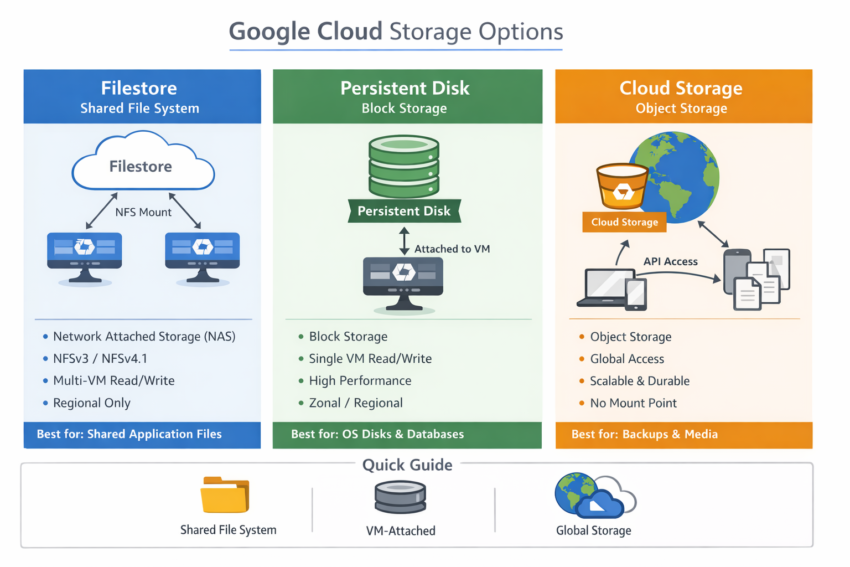
When designing applications in Google Cloud, selecting the right storage option is critical for performance, scalability, and cost efficiency. Understanding the Types of Storage in Google Cloud Platform (GCP) helps architects and engineers choose the most suitable service for their workloads.
Google Cloud Platform offers three primary storage models:
- File Storage
- Block Storage
- Object Storage
Understanding GCP Storage Options
The Types of Storage in Google Cloud Platform (GCP) are designed to address a wide range of business and technical requirements. Whether you need shared file access, high-performance disks for virtual machines, or scalable storage for unstructured data, GCP provides a managed solution.
Overview of Available Services
| Storage Type | GCP Service |
|---|---|
| File Storage | Filestore |
| Block Storage | Persistent Disk, Local SSD |
| Object Storage | Google Cloud Storage |

GCP Storage Type: File Storage
Imagine you’re working on media files that need to be shared with multiple team members for editing. Enterprise users require a secure and reliable way to share files across systems, and this is where file storage becomes valuable.
File Storage, also known as Network File Storage (NFS), provides a shared file system that multiple compute instances can access simultaneously. Applications interact with the storage as if it were a local file system.
Unlike object storage, file storage supports:
- Hierarchical directories
- File permissions
- File locking
- Shared access across multiple instances
These capabilities make file storage ideal for enterprise applications and legacy workloads.
GCP Service
👉 Filestore
Best Use Cases
- Content management systems
- Media and entertainment workloads
- Shared development environments
- Enterprise applications requiring NFS
GCP Storage Type: Block Storage
Block storage divides data into fixed-size blocks and stores each block independently. When an application requests data, the storage system reassembles the blocks into a complete file.
In Google Cloud, block storage volumes are attached directly to Compute Engine instances and behave like locally mounted disks. This provides low-latency access and high performance.
GCP Services
👉 Persistent Disk
👉 Local SSD
Persistent Disk
- Durable network-attached block storage
- Supports snapshots and resizing
- Suitable for production workloads
- Can be attached to Compute Engine virtual machines
Local SSD
- Physically attached to the same host as the virtual machine
- Extremely low latency and high IOPS
- Ideal for temporary data and cache-intensive workloads
- Best suited for performance-sensitive applications
Best Use Cases
- Databases
- Virtual machine boot disks
- Enterprise applications
- Transactional workloads
GCP Storage Type: Object Storage
Object storage is designed to store and manage large volumes of unstructured data such as:
- Images
- Videos
- Backups
- Archives
- Application logs
Data is stored as objects, where each object contains:
- The actual data
- Metadata describing the object
- A unique identifier
Objects are stored inside containers known as buckets.
Unlike traditional file systems, object storage uses a flat namespace rather than a hierarchical directory structure. This architecture provides virtually unlimited scalability, durability, and accessibility.
GCP Service
👉 Google Cloud Storage (GCS)
Best Use Cases
- Backups and disaster recovery
- Data lakes
- Media storage
- Static website content
- Big data analytics
Choosing the Right Storage Service
The best storage option depends on your workload requirements.
| Storage Type | GCP Service | Best Use Cases |
|---|---|---|
| Object Storage | Google Cloud Storage | Backups, archives, media files, big data |
| Block Storage | Persistent Disk, Local SSD | VM disks, databases, high-performance applications |
| File Storage | Filestore | Shared file systems, enterprise applications, collaboration |
Conclusion
Understanding the Types of Storage in Google Cloud Platform (GCP) is essential for building scalable and efficient cloud architectures.
- Filestore provides shared file storage for enterprise and collaborative workloads.
- Persistent Disk and Local SSD deliver high-performance block storage for virtual machines and databases.
- Google Cloud Storage offers highly durable and scalable object storage for unstructured data.
Choosing the appropriate storage service ensures optimal performance, reliability, and cost efficiency for your cloud applications.