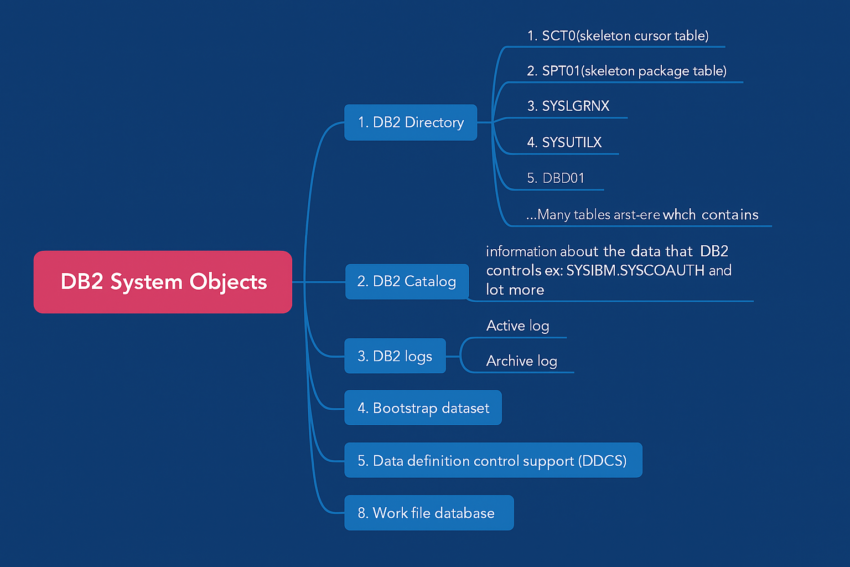
When IBM Db2 is installed on a z/OS mainframe environment, it operates as a specialized system service known as a subsystem that spreads across multiple address spaces. To manage massive enterprise workloads, ensure data integrity, and deliver lightning-fast query performance, the Db2 architecture relies on an interconnected network of internal system objects.
Whether you are a mainframe developer, a database administrator (DBA), or preparing for a technical interview, understanding these core components is essential.
This guide breaks down the critical Db2 system objects—including the Directory, Catalog, Logs, Buffer Pools, and Tablespaces—and explains exactly how they keep enterprise data moving.
This guide breaks down the core DB2 system objects—including the DB2 Directory, Catalog, Logs, Buffer Pools, and Tablespaces—to give you a clear understanding of how Db2 functions on IBM mainframes.

🔹 1. DB2 Directory
The Db2 Directory is the powerhouse behind internal database operations. Unlike other objects, it is managed exclusively by the system—users cannot query or modify it directly.
The Directory resides in the system database DSNDB01 and is made up of five vital tablespaces that track object definitions, utility states, and system recovery points:
- SCT02 (Skeleton Cursor Table): Stores internal runtime structures for static SQL statements bound to a
PLAN. When you run aFREE PLANcommand, its structure is automatically cleaned out. - SPT01 (Skeleton Package Table): Holds the compiled package definitions. Running a
FREE PACKAGEcommand removes these structures. - DBD01 (Database Descriptor Table): Contains operational metadata about all Db2 objects. Whenever you issue Data Definition Language (DDL) commands to create or alter an object, Db2 references and updates the DBD here.
- SYSUTILX: The active monitor for online Db2 utilities. It tracks the operational status of jobs running in the system and clears entries once the utility finishes.
- SYSLGRNGX: Records the precise log ranges for when tablespaces, indexes, and partitions are opened or closed. This tracking makes it absolutely critical for point-in-time recovery operations.
🔹 2. DB2 Catalog
While the Directory handles internal operational mechanics, the Db2 Catalog stores the metadata that developers and DBAs interact with daily. The Catalog is a structured collection of system tables located in the DSNDB06 database.
Commonly queried tables include:
SYSIBM.SYSTABLES– Information about user tablesSYSIBM.SYSCOLUMNS– Information about columnsSYSIBM.SYSTABAUTH– Authorization details
Whenever you create, alter, or drop a DB2 object using DDL (Data Definition Language), or modify access using DCL (Data Control Language), DB2 automatically updates the Catalog tables.
Unlike the Directory, you can query DB2 Catalog tables (for example, checking table definitions or user permissions), but you cannot modify them directly.
[Incoming SQL Query]
         │
         ▼
[Check SYSIBM.SYSTABLES] ──► Does the table exist?
         │
         ▼
[Check SYSIBM.SYSCOLUMNS] ──► Do the columns match?
         │
         ▼
[Check SYSIBM.SYSTABAUTH] ──► Does the user have authority?
         │
         ▼
[Check DBD01 (Directory)] ──► Fetch physical structure descriptors
         │
         ▼
[Execute Query Execution Plan]
🔹 3. DB2 Logs
To maintain strict ACID (Atomicity, Consistency, Isolation, Durability) compliance, Db2 logs every single database modification (INSERT, UPDATE, DELETE) before writing changes to disk. Mainframe systems separate this into a two-tier logging architecture:
- Active Logs: High-speed, primary storage datasets that record live, recent transactions.
- Archive Logs: When an active log dataset fills up, Db2 triggers a “log switch,” copying older data to long-term storage disks or magnetic tapes.
Every log entry is stamped with a unique Log Sequence Number (LSN) or Log Record Identifier, which is crucial for handling rollbacks, point-in-time recovery, and crash recovery following an unexpected system outage.
🔹 4. Bootstrap Dataset (BSDS)
The Bootstrap Dataset (BSDS) acts as the inventory tracker for the Db2 logging system. It contains a fault-tolerant master list containing:
- The exact names and locations of all active and archive log datasets.
- The system Relative Byte Address (RBA) and LSN history.
- The active conditional restart control records.
Because Db2 uses the BSDS to locate log files during startup, Db2 cannot restart without a healthy, undamaged BSDS. For high availability, DBAs always mirror this dataset using dual BSDS configurations.
🔹 5. DB2 Buffer Pools
A Buffer Pool acts like cache memory for DB2. It stores frequently accessed pages (tables or indexes) in memory, reducing physical I/O operations.
- Maximum buffer pool size = 1 TB
- Improves query performance by avoiding repeated disk reads
🔹 6. Resource Limit Facility (RLF)
The Resource Limit Facility (RLF) allows administrators to control DB2 resource usage.
- Limits costly operations (like SQL binds) during peak hours
- Can set thresholds for dynamic SQL statements
- Helps prevent system contention and performance degradation
🔹 7. Work Databases (DSNDB07)
Not all data processing can happen neatly within a buffer pool. Complex queries that involve operations like GROUP BY, DISTINCT, UNION, or massive joins require a scratchpad.
Db2 routes these temporary operations to the Work Database (DSNDB07). Using dynamic temporary work files like SORTWK1, the system efficiently processes intermediate sort steps and transient result sets before pushing the final output back to the application client