GCP Security IAM + responsibility model: A Complete Overview
Google Cloud Platform (GCP) offers a robust set of security features designed to protect data, applications, and infrastructure. One of the core concepts behind GCP security is the Shared Responsibility Model
Google is responsible for security of the cloud (physical data centers, hardware, networking, hypervisor).
Customers are responsible for security in the cloud (IAM, data classification, encryption configuration, OS patching for IaaS etc).
Understanding the Shared Responsibility Model in GCP
In context for GDPR, Under the shared responsibility model, Google Cloud acts as the data processor, while the customer or organization is the data controller. This means:
- Google is responsible for securing the underlying cloud infrastructure.
- Organizations retain full control over how their data is stored, accessed, and managed.
- Customers can configure security settings based on their business and compliance needs.
This approach gives organizations flexibility while maintaining a high level of built-in cloud security.
Identity and Access Management (IAM) in Google Cloud
Identity and Access Management (IAM) is a foundational security service in GCP that spans across all Google Cloud products. It controls who can access what resources and what actions they can perform.
IAM allows administrators to:
- Grant or restrict access to GCP resources
- Define permissions at a highly granular level
- Follow security best practices such as the principle of least privilege
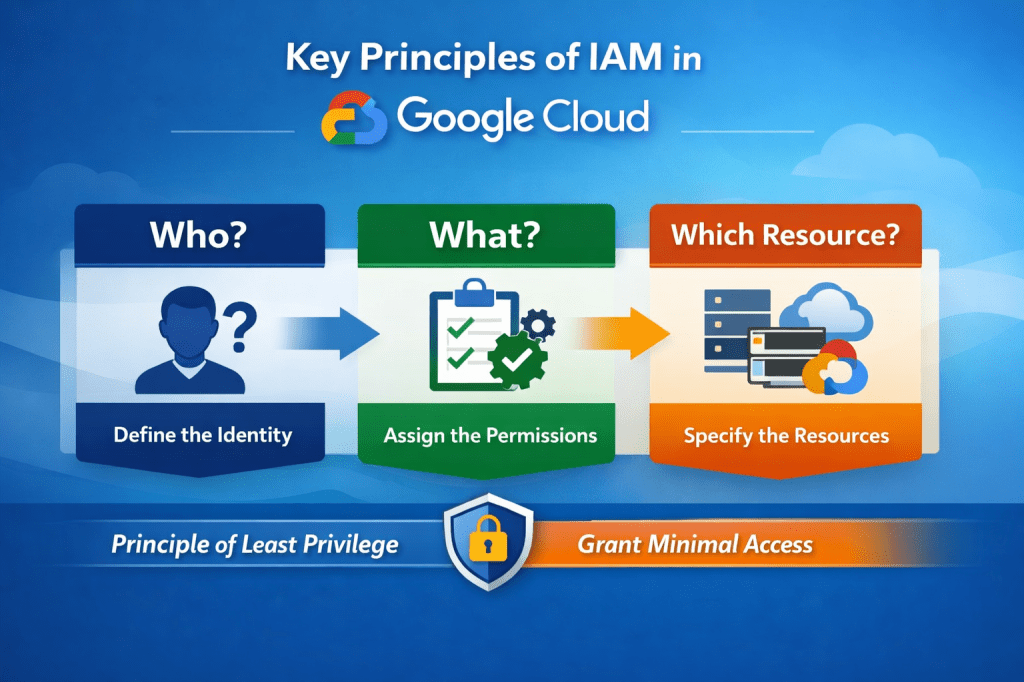
How IAM Works: The Three Core Components
An IAM policy in Google Cloud defines access control for a resource by binding principals to roles. Each policy specifies who (principal) has what access (role and permissions) on which resource.
1. Who (Principal)
The principal defines who is requesting access to a resource. This can include:
- Individual Google accounts
- Google Groups
- Service accounts
- Google Workspace accounts
- Cloud Identity domains
2. What (Permissions and Roles)
The second component specifies what actions the principal is allowed to perform. Permissions are granted through IAM roles, which bundle multiple permissions together.
GCP provides:
- Predefined roles managed by Google
- Custom roles created and maintained by organizations
Each user or group is assigned one or more roles that determine their allowed actions.
3. On Which Resource
The final part of an IAM policy defines which GCP resources the permissions apply to. Access can be limited to:
- Entire projects
- Specific services
- Individual resources (such as a single VM or storage bucket)
Finally, An IAM Policy binds principals (users, groups, or service accounts) to roles on a specific Google Cloud resource.
Principle of Least Privilege in IAM
Google Cloud IAM follows the least-privilege security model, which recommends granting users and systems only the minimum permissions necessary to perform their tasks.
Benefits include:
- Reduced risk of accidental or malicious changes
- Improved compliance and audit readiness
- Stronger overall cloud security posture
Types of IAM Roles in Google Cloud
IAM roles in GCP fall into three main categories:
1. Basic Roles
Basic roles apply across all GCP services and include:
- Owner – Full control over resources and access management
- Editor – Can create, modify, and delete most resources, but cannot manage IAM policies.
- Viewer – Read-only access; commonly used for auditors
- Browser (Beta) – Can browse GCP products but cannot view resource details
2. Predefined Roles
Predefined roles are service-specific and maintained by Google. They offer more granular permissions compared to basic roles and are updated automatically as GCP services evolve.
3. Custom Roles
Custom roles allow organizations to define their own permission sets. While this provides maximum flexibility, organizations are responsible for maintaining and updating custom roles as GCP services change.
 DBzTech-Technology Dossier
Leave a comment