Revisiting VM Architecture and Its Limitations
To understand the concept of a container, let’s first revisit the architecture of a virtual machine (VM) and examine why, despite its popularity, it has inherent drawbacks. By definition, a VM runs on a hypervisor and provides an abstraction over the underlying physical hardware.
Conceptually, a VM partitions/slices hardware resources vertically. Each VM includes its own guest operating system and applications or databases are hosted on that guest Operating system.

Because each VM carries its full OS and environment, there are certain drawbacks to it.
Licensing and maintenance cost — Each guest OS may require its own licensing, patching, and upkeep, increasing operational complexity and expense.
High disk space utilization — Each VM requires its own OS image and associated files, consuming large amounts of storage.
Longer boot times — Rebooting a VM means booting a full operating system each time, making it slower to bring services online.
Enter Containers — A More Efficient Approach
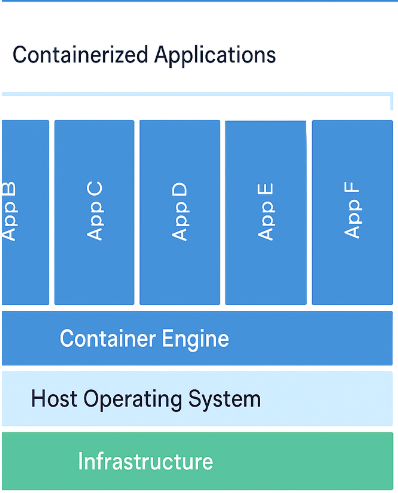
Containers address many of the drawbacks of VMs by shifting the abstraction layer. Instead of abstracting hardware via a hypervisor, containers abstract the Host operating system — they are hosted on top of the host operating system.
A container is essentially an application packaged with all the necessary files, libraries ( DLLs in Windows parlance ), dependencies and runtime environment needed to execute consistently across different environments. Imagine for a website, we need the scripts, web images, HTML codes all bundled in a box which is the container. This “bundle” ensures that once the container is built, it can run on any compatible host without additional configuration.
How containers work:
A container engine (for example, Docker Engine or Podman) unpacks the container image and interfaces directly with the host OS.
Because containers share the host OS kernel rather than including a full guest OS, they require significantly fewer resources (storage, memory, CPU) and start much faster.
Pictorially,

So, what are the tools for Containers? Container tools come in two segments:
- The tool to create containers – Docker
- The tool to manage containers – K8
Docker: A popular containerization tool that packages applications with their dependencies, enabling consistent deployment across environments. Works well with cloud platforms and configuration tools like Ansible, Puppet, and Chef. Docker Engine is open-source and free.
Kubernetes (K8s): An open-source container orchestration platform that automates deployment, scaling, and management of containers. Originally developed by Google.
When to Use Virtual Machines Instead of Containers
Although containers have many advantages, VMs still have valid use cases:
- Applications needing stronger OS isolation
- Environments running different OS types on the same host
- Legacy systems not built for containerization
Final Thoughts — Containers as the Future of Application Deployment
In short:
- VMs virtualize hardware; they’re heavier and slower but offer stronger isolation.
- Containers virtualize the OS; they’re lightweight, faster, and perfect for modern cloud-native applications.
 DBzTech-Technology Dossier
Leave a comment