When IBM Db2 is installed on z/OS, it operates as a subsystem and runs across multiple address spaces. Just like other z/OS components, DB2 architecture on z/OS relies on several core system objects that work together to manage storage, metadata, recovery, and query performance.
This guide breaks down the core DB2 system objects—including the DB2 Directory, Catalog, Logs, Buffer Pools, and Tablespaces—to give you a clear understanding of how Db2 functions on IBM mainframes.
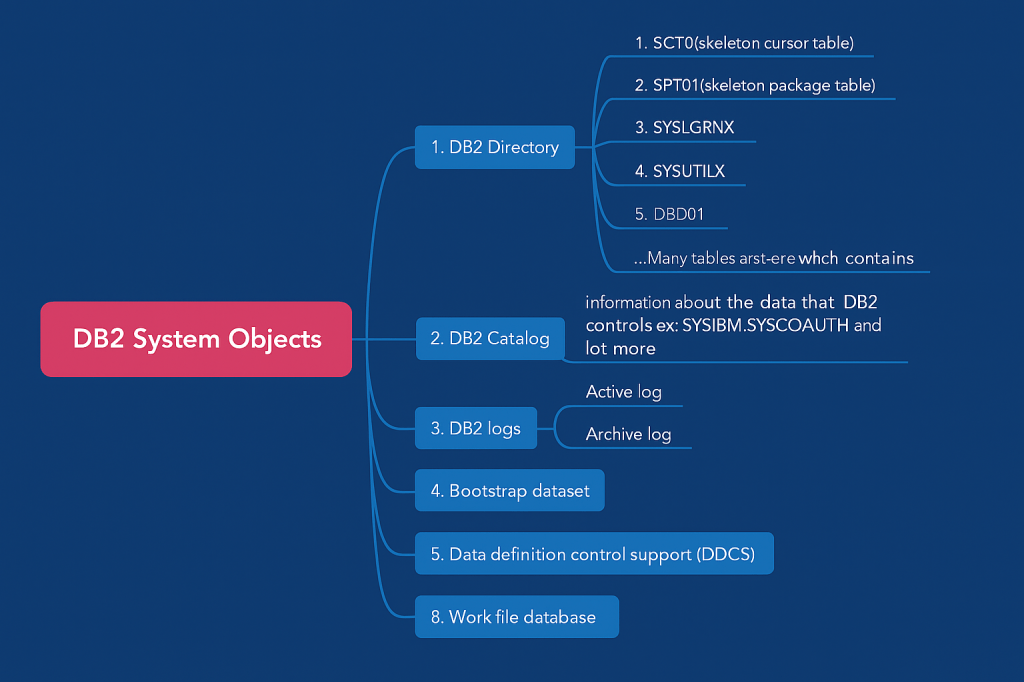
🔹 1. DB2 Directory
The DB2 Directory is one of the most important internal system objects. It is not directly accessible by users but is used continuously during normal DB2 operations. The DB2 Directory resides in the DSNDB01 database, which contains five key tablespaces:
- SCT02 (Skeleton Cursor Table) – Stores cursor information for SQL statements bound to a PLAN. When a plan is freed (
FREE PLAN), its structure is removed. - SPT01 (Skeleton Package Table) – Stores package definitions. When a package is dropped (
FREE PACKAGE), the structure is removed. - DBD01 (Database Descriptor Table) – Contains metadata about all DB2 objects. DB2 updates this whenever objects are created or altered.
- SYSUTILX – Tracks the status of DB2 utilities running online. When a utility finishes, its entries are cleared.
- SYSLGRNGX – Tracks the opening and closing of tablespaces, indexes, and partitions. It is critical during DB2 recovery operations.
🔹 2. DB2 Catalog
The DB2 Catalog is a collection of system tables that store metadata about DB2 objects. For example:
SYSIBM.SYSTABLES– Information about user tablesSYSIBM.SYSCOLUMNS– Information about columnsSYSIBM.SYSTABAUTH– Authorization details
Whenever you create, alter, or drop a DB2 object using DDL (Data Definition Language), or modify access using DCL (Data Control Language), DB2 automatically updates the Catalog tables.
Unlike the Directory, you can query DB2 Catalog tables (for example, checking table definitions or user permissions), but you cannot modify them directly.
👉 Example: When a SQL query is run, DB2 checks in the Catalog tables to validate that:
- The table exists (
SYSTABLES) - The column exists (
SYSCOLUMNS) - The user has authority (
SYSTABAUTH)
🔹 3. DB2 Logs
DB2 uses logs to track every database change (INSERT, UPDATE, DELETE).
- Active Logs – Contain the most recent transactions.
- Archive Logs – Older logs migrated to tape or disk for long-term recovery.
Logs are critical for DB2 crash recovery and rollback operations. Each entry has a Log Sequence Number (LSN) for tracking.
🔹 4. Bootstrap Dataset (BSDS)
The Bootstrap Dataset (BSDS) contains essential information for DB2 system recovery and restart, including the location and names of DB2 log datasets. Without BSDS, DB2 cannot be restarted properly.
🔹 5. DB2 Buffer Pools
A Buffer Pool acts like cache memory for DB2. It stores frequently accessed pages (tables or indexes) in memory, reducing physical I/O operations.
- Maximum buffer pool size = 1 TB
- Improves query performance by avoiding repeated disk reads
🔹 6. Resource Limit Facility (RLF)
The Resource Limit Facility (RLF) allows administrators to control DB2 resource usage.
- Limits costly operations (like SQL binds) during peak hours
- Can set thresholds for dynamic SQL statements
- Helps prevent system contention and performance degradation
🔹 7. Work Databases
Work files are stored in DSNDB07 and are used for temporary processing, such as sorting (SORTWK1) or intermediate result storage during complex SQL operations.
 DBzTech-Technology Dossier
Leave a comment