The Data step’s function in SAS program is to bring or format the raw data into a structure or a layout as defined in the INPUT keyword. To bring it into shape, it is evident it needs to be stored in some temporary memory buffer. This is where the concept of input buffer and PDV comes into play. When a SAS program is submitted the execution happens in two phases – Compilation and Execution.
During compilation phase, each statement within the data step are scanned for errors. Output of compilation phase are the:
1. Input Buffer– This is created when SAS program reads the data from external file. The records are hold temporarily before moving to PDV. If the input data is SAS dataset, SAS directly writes to PDV.
2.PDV – Forms the foundation of data manipulation and transformation. Think of it as internal structure used to store and process data internally before writing into the output. PDV has 2 automatic variables.
_N_ : This indicates the number of observation read from input
_ERROR_ : can have the values 0 (zero) or 1.
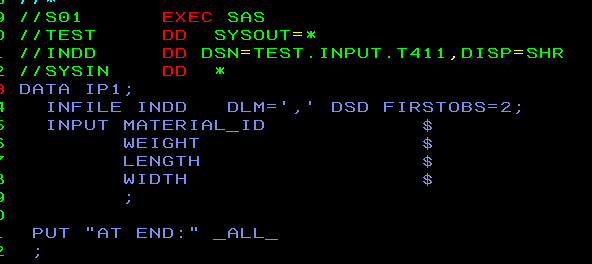
These two variables are not written to output SAS datasets. However one can print them to view them in SASLOG using _ALL_ option. Let’s look into the JCL.
Output in SASLOG will look like:
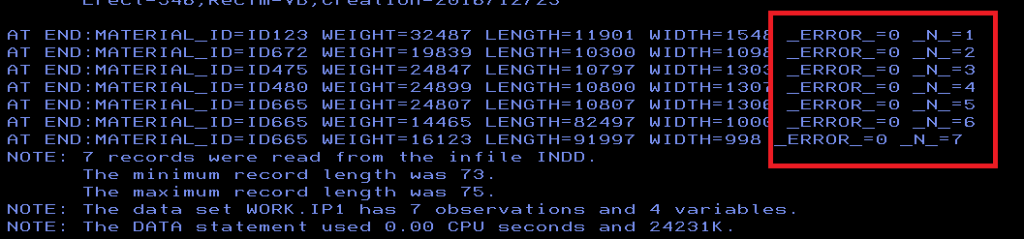
By looking into the output you can understand there are 7 observations _N_ = 1,23….7 and
_ERROR_ = 0 for all the observations.
We will look into the detailed uses of these variables in other post.
 DBzTech-Technology Dossier
Leave a comment