The COMPRESS Function in SAS is used to remove specific characters from a string. In general dealing with Blanks can be challenging, but SAS provides few functions to do this efficiently. COMPRESS returns character string with specific characters removed from the original string. The syntax is as follows:
COMPRESS(string, characters to be removed, modifier).
The modifier parameter needs to be used diligently to get the required result.
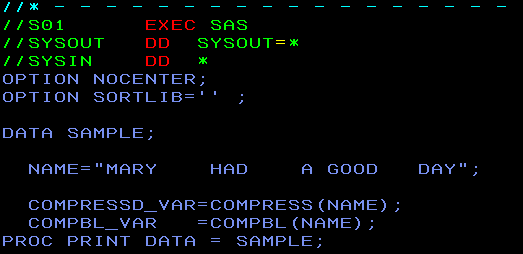
To begin with, we will see how to remove all the spaces from the text string “MARY HAD A GOOD DAY” using COMPRESS function.

The output:

The modifier options for COMPRESS function are as follows:
A: Remove all alphabetical characters from String.
AK: Keep only alphabets from String.
KD: Keep only numeric values from String.
D: Remove numerical values from String.
I: Remove specified characters (both upper and lower case) from String.
K: Keep the specified characters in the String instead of removing them.
I: Remove lowercase characters from String.
P: Remove punctuation characters from String.
S: Remove spaces from String. This is the default.
U: Remove uppercase characters from String.
Refer to SAS manual for more details.
On the other hand the COMPBL will compress more than one consecutive spaces into one space.
Let’s see how the COMPBL looks like with the current example:
Output:

 DBzTech-Technology Dossier
Leave a comment