Having a clear understanding of Zoned Decimal format is essential before diving into Packed Decimal (COMP-3) format in COBOL.
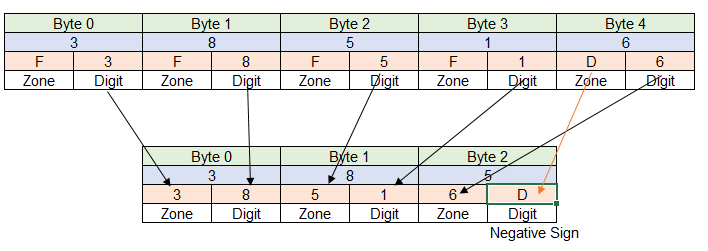
In Packed Decimal format, each byte’s zone portion stores the next numeric digit, allowing two digits to be packed into a single byte—hence the name packed decimal. Each byte in a packed decimal field holds two numeric digits, except for the rightmost byte, which also contains the sign of the number. All other zone values are stripped, making packed decimal storage highly efficient for numeric computations.
For example, consider the negative number 38516. In COMP-3 format, the zone portion of each byte stores a digit, while the rightmost byte stores the sign. The low-order four bits (digit portion) of this byte indicate the sign: F for positive and D for negative.
Before performing calculations, any numeric field not already in packed decimal format is typically converted to COMP-3. This ensures accurate arithmetic operations in COBOL programs.
However, Packed Decimal (COMP-3) data is not human-readable, so it should not be used for printing output. Each storage position represents digits in a compact format, meaning direct printing of packed decimals will produce unreadable characters.
Understanding zoned decimal vs packed decimal formats is crucial for COBOL developers to optimize numeric field storage and ensure efficient data processing in legacy systems
 DBzTech-Technology Dossier
Leave a comment